
Booking Process
Modified on: 2026-04-23 11:13
TABLE OF CONTENTS
- Introduction
- Hold Booking (Two-Step Process)
- Instant Booking (One-Step Process)
- Determining the Booking Flow
Introduction
This section outlines the two booking workflows available in the API: Hold and Instant. Please note that these workflows define the sequence of API calls within the DerbySoft GDN system only. A successful "Hold" operation in our system does not guarantee that the airline has confirmed or is honoring the seat reservation. Final inventory control and booking confirmation remain solely with the airline.
The booking workflow required for a given offer is defined by the airline and its fare rules. Partners should refer to the supportedIssueWay attribute provided in earlier search and pricing responses to determine the appropriate process to follow.
Hold Booking (Two-Step Process)
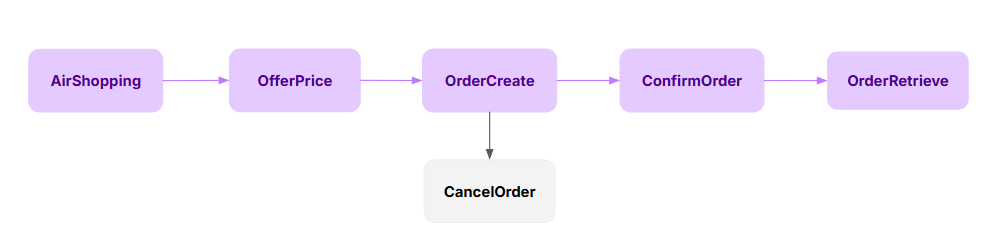
Steps
Step 1: OrderCreate
Purpose: To create a new order in the DerbySoft system without immediate payment.
Action: Submits passenger and itinerary details. Upon success, the order is created with a "HOLD" status, and an OrderID is returned.
Note: Payment details are not submitted in this step.
Step 2: ConfirmOrder
Purpose: To confirm the held order by submitting payment information.
Action: Uses the OrderID from Step 1 to submit payment details. Upon successful payment processing, the order status is updated to CONFIRMED.
Step 3: orderRetrieve
If the CconfirmOrder response status is HOLD, it is recommended to call orderRetrieve to query the specific ticketing result.
Instant Booking (One-Step Process)

Step
Step: OrderCreate with Payment
Purpose: To create and confirm an order in a single API call.
Action: Submits all passenger, itinerary, and payment details in one request. The system will attempt to create the order and process the payment simultaneously. The order status is set to "CONFIRMED" upon success.
Determining the Booking Flow
Partners must program their system to determine the correct booking workflow based on the offer data.
- Source of Information: The
supportedIssueWayattribute is returned within the offer data of both theAirShoppingRSandOfferPriceRSmessages. - Field Values and Meaning:
- "HOLD": The two-step Hold process (
OrderCreatefollowed byConfirmOrder) is required for this offer. - "INSTANT": The one-step Instant process (
OrderCreatewith payment details) is required for this offer.
- "HOLD": The two-step Hold process (
- Partner Action: Your system must evaluate the
supportedIssueWayvalue for the selected offer and initiate the corresponding booking sequence. Using an incorrect flow for an offer will result in an error.
Example
If the OfferPriceRS returns "supportedIssueWay": "HOLD", you are required to first call OrderCreate (without payment) and then call ConfirmOrder (with payment) to complete the booking.
Important Note on Airline Confirmation:
1.DerbySoft's API processes bookings according to the workflows described above.
2.However, a successful "Hold" status in the DerbySoft system does not equate to a confirmed hold with the airline. The airline may reject or cancel the reservation based on availability or other rules until the booking is fully confirmed (ticketed).
3.Always rely on the final order status and the airline's confirmation for the definitive booking state. Use the OrderRetrieve endpoint to check the latest status of any order.
Did you find it helpful? Yes No
Send feedback